

What is CryptoWall?

CryptoWall and its variants are cybercriminals' favorite tools. Ransomware incidents, according to the 2018 Verizon Data Breach Investigation Report, account for approximately 40% of all malware incidents! Some reports say that CryptoWall 3.0 has caused over $325 million in damage since its first release.
CryptoWall first appeared in 2014. Cybercriminals have updated and renewed their systems many times over the years to further strengthen this formation.
The CryptoWall virus is cheap and easy to use. It spreads very quickly and people exposed to the virus accept paying ransom in the hope of getting their files back (We never recommend this). It is necessary to take precautions to protect your data from the CryptoWall virus and all its variants.
What is the CryptoWall Virus?
CryptoWall is ransomware. It does much more than encrypting your files and cyber pirates ask you to pay money for the decryption key. It hides within the operating system and also adds itself to the Startup folder. Worse still, CryptoWall deletes shadow copies of your files and makes it difficult (in some cases impossible) to restore data. If you want to take a precaution, try to get your personal data, passwords, and Bitcoin wallets from the file.
CryptoWall 3.0 has been the most damaging version so far. Strong RSA-2048 encryption is used to lock your files and get ransom.
In the CryptoWall v4 update, they added a new feature to encrypt both files and file names. This means that you won't be able to look at the file name to check if you have a backup (and to restore it).
CryptoWall v5.1 HiddenTear is the latest version of their malware. It uses a different AES-256 encryption that is incompatible with previous versions. It is also possible that the developers use the CryptoWall name without using any of the original codes.
There are several CryptoWall variants: for example; CryptoDefense is one of these variants.
How Does CryptoWall Work?
There are several different methods for CryptoWall to spread and infect devices:
Phishing Email: CryptoWall is usually directed through a phishing email. Phishing emails try to trick users into clicking a link that will download malware to the computer.
Exploit Kits: The next most common attack vector is part of an exploit kit that exploits vulnerabilities to distribute the malware needed to carry out the attack. Known vulnerabilities can be in the operating system, in the applications you use, or on websites you visit like WordPress.
Malicious Ads: Cybercriminals buy or hack internet ads to infect you with malware through your browser. These ads start running javascript in your browser to download malware before you even notice.
NOTE: Code injection is a common hacking technique. It may not always be intended to cause harm.
When CryptoWall infects your computer, it injects new code into explorer.exe (according to the installed Windows version) and restarts explorer.exe. This malicious version of explorer.exe loads the malware onto the computer and deletes volume shadow copies. It disables Windows services and starts a new svchost.exe process.
Sometimes, it cannot inject code into explorer.exe. CryptoWall uses the svchost.exe tool to create a new explorer.exe that it can inject code into in this case. Svchost.exe is also responsible for home network communication, file encryption, and removing the malware after the process is complete.
CryptoWall loads itself into the registry and your startup folder. After this formation, you cannot escape from this situation even if you restart. Even if you take it to Safe Mode, if you cannot remove the CryptoWall software, crypto starts processing again even when you log in again.
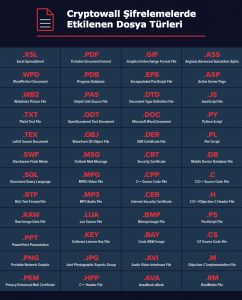
For the ransomware attack to continue, CryptoWall needs to communicate with a Command and Control (C&C) server. C&C sends CryptoWall the encryption key it will use to encrypt your files. CryptoWall then runs all your files both locally and on connected networks and encrypts your personal data such as your documents, presentations, code, music files, and images.
Encryption locks the content of your files and the only way to get them back is the key that will decrypt the encryption.
CryptoWall Note
After encryption is complete, you receive a ransom note containing instructions on how to make the payment. They usually ask for approximately $1000 worth of Bitcoin. After the ransom note is left, the malware deletes itself.
Attackers may offer to decrypt one or two files for free as a gesture of goodwill: don't fall for this. There is never a guarantee that you will get your files back. Only 19% of users who pay the ransom get their files back.
How Can You Protect Yourself Against CryptoWall?
It is not very possible to get your files back. In this case, taking precautions is better than producing solutions.
Tips to prevent (or remove) potential ransomware attacks:
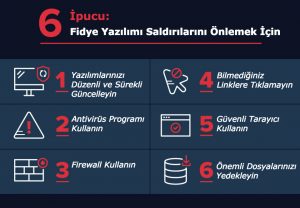
Keep your computer's operating system software patches up to date
Malware uses existing security vulnerabilities in software to infiltrate the computer. If you cannot detect these security vulnerabilities, you leave an open door for cybercriminals to enter. If you keep the operating system and all your applications updated to the latest versions, you will be more likely to stay away from malware.
Use an anti-virus scanner
Anti-virus solutions, when regularly updated, can protect you against various software attacks. Anti-virus programs quarantine known malware programs and prevent them from running.
Use a firewall
A local firewall can protect you from some connections that malware uses, such as Command and Control servers. Especially CryptoWall Ransomware is dependent on connection to the main base to continue the attack. A local firewall can prevent the malware from establishing this connection and carrying out the attack.
Don't click on links
Don't click on links you don't know or download files from suspicious emails. If you click on a malicious link or download a malicious file, you are inviting cybercriminals and their malware into your home.
Develop safe browsing habits
Make sure your browser is up to date, use strong encryption, turn off ads and JavaScript. Be selective about which ads you allow to be published and make sure they come from trusted sources.
Back up your files
Always create a backup of your files. You can find varying security levels and many affordable options for online cloud storage. You can also provide a hard drive to back up your important files. However, make sure this drive is not always connected to the computer.
If you are vulnerable to CryptoWall and it has infected your computer, remove CryptoWall before using your computer again:
Start your computer in Safe Mode with Networking
If you have a safe and clean System Restore point, you can restore in the following cases:
- Download and install the malware removal application on your computer.
- Run the malware removal application and scan all your files
If you are planning a company-wide security strategy to protect against ransomware attacks, there are a few more things to consider in addition to our recommendations above for end users:
- Protect your computer that you have privileged for your company: Users should only be able to access the files they need. This way, if it is captured by CryptoWall, the ransomware can only encrypt these files. By implementing this privilege model, you also limit the scope of the ransomware attack. In addition, you can bring back the data with a simple recovery process with a good backup process.
- Take advantage of security analytics to protect your files from ransomware: Some special programs monitor your corporate data stores, mailboxes, proxies, DNS and VPNs with threat models designed specifically to catch ransomware attacks.
A ransomware attack can cause many losses on a company basis: loss of productivity, leakage potential, data loss or theft, cost losses to be paid for recovery, and more. You can consult Tekniknokta experts to see how we can protect your valuable data and help prevent CryptoWall viruses.