What to Do for Data Security
In data loss, what decides the outcome is usually not the failure itself but the next thirty minutes. What you do the moment your drive starts making noise, your files disappear or the system refuses to boot determines whether the data stays recoverable. In a significant share of the cases that reach our laboratory, the real damage came not from the original fault but from what was attempted afterwards.
This article covers two separate things: what to do and what to avoid when data loss happens, and the routine you should put in place before it does.
What not to do when you lose data
Each of the following can turn a recoverable case into an unrecoverable one:
- Do not keep powering the device on. On a drive with a mechanical fault, every spin-up can mean the read head touching the platter surface. Data that could have been recovered on the first attempt may be scraped off the platter by the tenth. If a drive clicks, whines repeatedly or grinds, shut it down immediately and leave it off.
- Do not run data recovery software. These tools are designed for logical faults and assume the drive is healthy. Scanning a physically failing drive for hours stresses the head assembly, and writing recovered files back to the same drive risks overwriting the very data you are trying to save.
- Do not reinstall the operating system, format, or run chkdsk. All of these write to the disk. A deleted file remains on the drive until something is written over it; writing removes that chance.
- Do not swap the circuit board yourself. A board taken from an identical model usually will not work: on modern drives the ROM chip on the board carries adaptive data unique to that drive. Powering the drive with the wrong board can damage the head assembly as well.
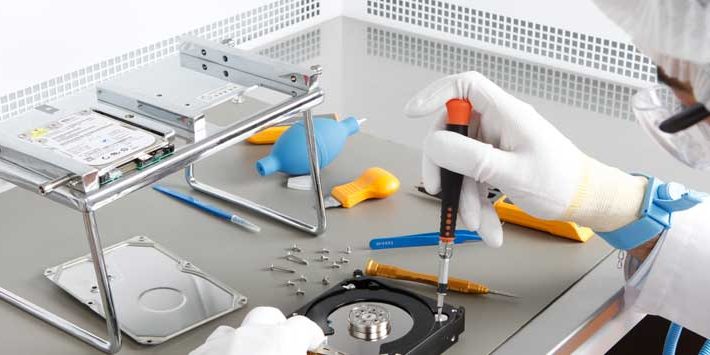
- Do not open the drive. A dust particle in an ordinary room is many times larger than the gap between the platter and the head. A drive opened outside a clean room takes permanent surface damage within seconds.
- Do not try to dry a water- or fire-damaged device. Hair dryers, rice and sunlight do not help; heat and corrosion make the damage worse. Put the device, still damp, into a sealed bag and bring it to the laboratory as it is.
- Do not hand the device to non-specialists. A drive that has already been opened "just to have a look" has a markedly lower chance of recovery. Our success rate drops visibly on cases that arrive after a failed attempt.
What to do when you lose data
- Cut the power. Shut the laptop down and unplug the charger; disconnect an external drive. Make sure the system cannot restart on its own.
- Write down what happened. When did the fault start, and during what operation? Was the device dropped, was there a power cut, did an error message appear, is there any noise? This information guides the analysis directly and shortens the process.
- Decide which data matters most. Recovering the whole drive is not always possible. Being able to say "this folder first" means the most valuable files are prioritised in partial recovery scenarios.
- Package the device properly. Put the drive in an antistatic bag, surround it with shock-absorbing material and ship it in a rigid box. Bubble wrap alone is not enough; an impact in transit can turn an existing fault into mechanical damage.
- Request a free analysis. Standard diagnostics in our laboratory are free. After the analysis we tell you what can be recovered, by which method and at what price. Nothing starts without your approval, and if the recovery fails there is no charge.
Before data loss: the 3-2-1 rule
Data recovery is not a substitute for backup. The most practical internationally accepted framework, for businesses and individuals alike, is the 3-2-1 rule:
- 3 copies — keep at least three copies of your data, including the original.
- 2 different media — store the copies on different types of media (an SSD and an external drive, or disk and tape). Two drives from the same brand and batch can develop the same manufacturing fault at the same time.
- 1 copy off-site — keep at least one copy physically elsewhere. Fire, flooding, theft or ransomware take every copy in the same room together.
There is a fourth point worth adding: test your backup. A backup that has never been restored is not a backup. In some of the corporate cases that reach us, the backup system appeared to have been running for months, but when a restore was attempted the archive turned out to be corrupt or incomplete. Perform a sample restore at least twice a year.
Everyday habits that reduce the risk
- Monitor drive health. A rising reallocated sector count in S.M.A.R.T. data is the clearest early warning that a drive is nearing the end of its life. Replace it when you see that — do not wait for it to fail.
- Watch how full your SSDs are. An SSD running permanently above 90% full loses wear-levelling efficiency and shortens controller life.
- Use an uninterruptible power supply. A sudden power cut during a write is the most common cause of file system corruption.
- If you use encryption, store the key separately. On a BitLocker or FileVault volume, a lost recovery key means the data cannot be read even if it is physically recovered. Back the key up somewhere independent of the drive itself.
- Dispose of retired devices securely. A formatted drive can still be read with basic software. For corporate equipment, certified data destruction is also a compliance requirement under GDPR and KVKK.
When should you go to a laboratory?
Stop trying on your own in any of these situations:
- The drive makes abnormal noise (clicking, repeated whining, grinding)
- The device is not detected by the BIOS or the operating system at all
- The drive is detected but reports the wrong capacity
- The device has been exposed to water, fire or a serious impact
- More than one drive in a RAID array has dropped out at the same time
- Your files have been encrypted by ransomware
Since 2007 we have been recovering data from hard disks, SSDs, RAID arrays, servers, NAS units and portable media in our ISO-certified laboratory in Sisli, Istanbul. Work requiring mechanical intervention is carried out in an ISO 5 (Class 100) clean room on the PC-3000 hardware platform. We do not quote a single average success rate; the outcome varies with the device type, the nature of the fault and — most of all — what was attempted after the failure. We give a case-specific estimate after the free analysis.
To have your case assessed, write to us or call the laboratory. For detail on the process, the laboratory and pricing, see our data recovery centre and pricing pages.